


To Add a new County Event
- On the Dashboard, click ‘My Calendar’ (its near the bottom!)
- Click on Add Event
- Enter the name of the event, e.g Work Scout Jamboree
- Enter in details in the big box
- Click on the categories of scouts the event is suitable for, click as many as you like (if you choose more than one you will be asked to also decide which is the main category)
- Enter the start time, end time and start date.
- If the event runs for more than one day, enter in the last day of the event
- Click the ‘All Day Event if apprioriate (note this will hide the time of the event)
- Click the ‘hide end date” if required
- Click on ‘same day event’ if appropriate (note this will hide the time of the event)
- Click on the Repitition if your event occurs on a set pattern
- Add an image for the event using the Set featured image button – this will take you to the media library
- Either select an image from the ‘media library’ if it has already been added,
- or click ‘upload files’ and search your mahine for the files
- Add the Location of the event
- check to seee if the location already exists – and use it
- if it does not alraedy exist, click the ‘Add new location’ button
- Click Publish
To Amend an Existing Event
- On the Dashboard, click ‘My Calendar’ (its near the bottom!)
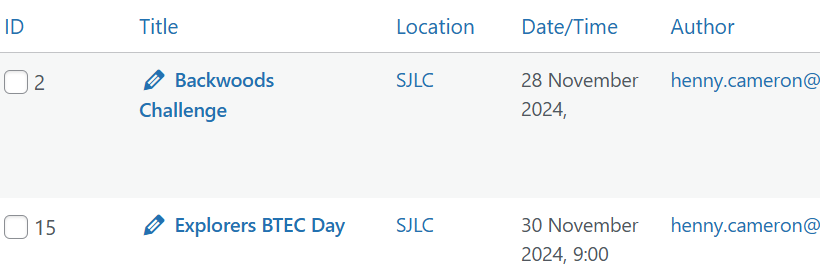
- Click on Events
- Scroll down until you find your event
- Click on the name of the event whioch has a pencil icon next to it (be very careful not to select delete from the line below!”)
- Amend/add detilas as above
- Click Update
To Duplicate an Event
Some events occur regularly, therefore to save typing, there is the ability to duplicate an event.
- On the Dashboard, click ‘My Calendar’ (its near the bottom!)
- Click on Events
- Scroll down until you find your event
- Hover over the name and some options will appear below
- Click on copy
- Over type the dates and any other details that need to change
- Press publish


